A defined scope
Start from a specific monitor and finding. Supported settings and comparisons depend on the connected source.
 Request a demo
Drift Detection
Compare observed policy and configuration settings with an expected baseline or an earlier snapshot. See the difference, examine the evidence, and decide what needs review.
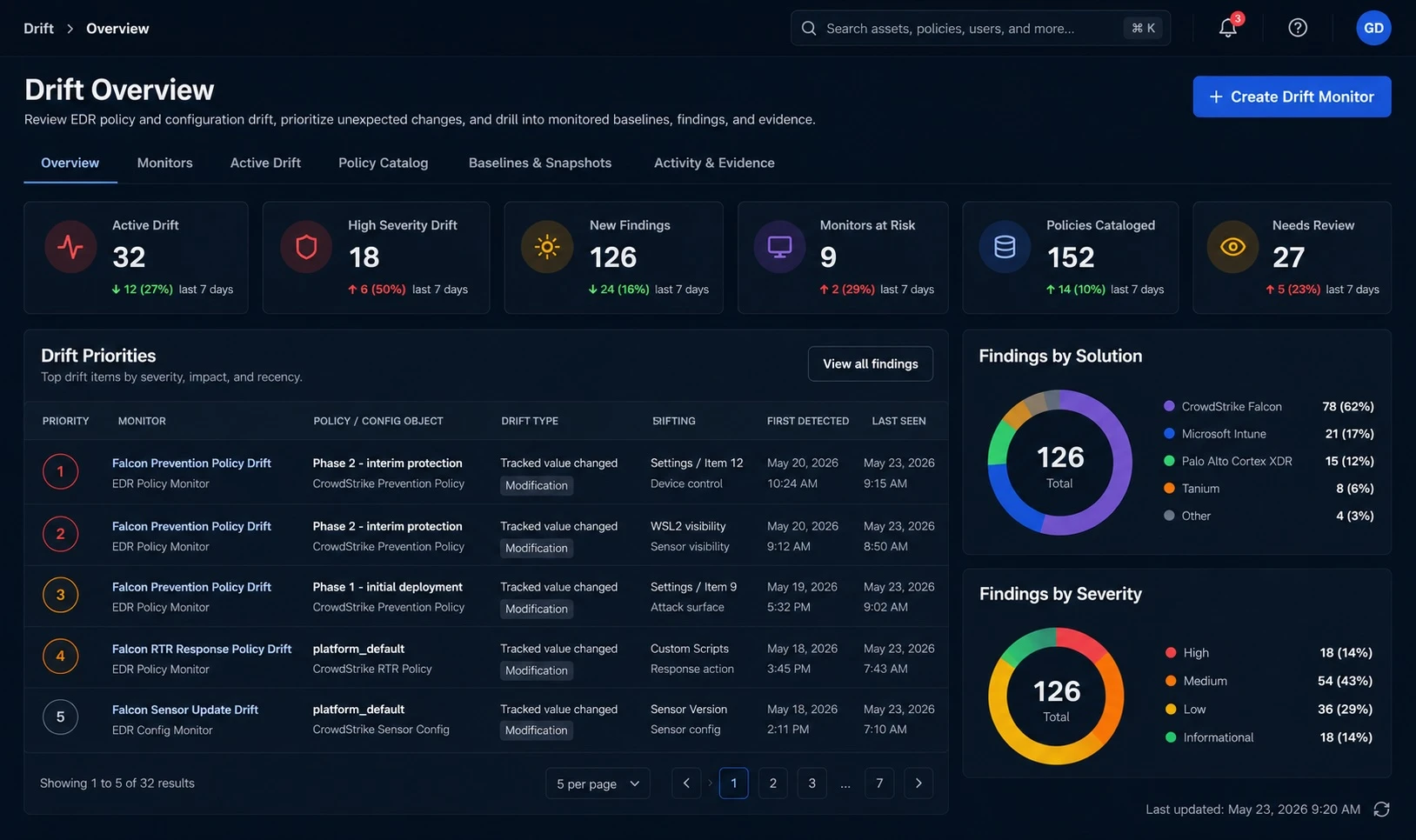
From visibility to investigation
Configuration drift is a difference between an observed configuration and the state you expect. Policy drift applies that comparison to security policy settings. GreyAware keeps findings connected to their monitor, source, and comparison evidence so your team can assess the change in context.
Define the monitor scope and tracked settings. Compare against a selected baseline or a previous observation, as supported by the monitor.
Review the affected policy or resource, changed setting, and available old and new values. Keep the source and evaluation time alongside the finding.
Use severity and available assessment context to prioritize investigation. Check approved changes and exceptions with the policy owner.
An investigation in practice
An observed prevention setting differs from the Finance policy baseline. The difference is clear; whether it is an intended change still needs an owner’s review.
Illustrative workflow and sample data.
A difference may reflect an approved change or exception. Validate the context before changing policy.
Review the baseline and the observed setting, with the source evidence used for the comparison.
Check the policy owner’s change record, the affected scope, and whether the observation is current.
Decide whether to restore the expected setting or record an approved exception, then review a subsequent evaluation.
Evidence for the next decision
Where enabled, GreyAware’s drift assessment agent adds review context to existing findings. It helps explain the evidence and its limitations so the policy owner can make an informed decision.
Explore the platformStart from a specific monitor and finding. Supported settings and comparisons depend on the connected source.
Use available severity, baseline, and change context to understand why a finding needs attention. Keep missing or uncertain evidence visible.
Drift assessment provides investigation and recommendation context. It does not automatically change policies or remediate devices.
Plan your evaluation
Start with your tools, the evidence you need, and the decisions your team makes.
Read our privacy policyConfiguration drift describes a difference from an expected configuration or previous state. Policy drift focuses on policy settings, such as endpoint protection configuration. The relevant comparison depends on the monitor and the source data.
Monitor configuration determines the source, objects, comparison, and tracked settings. Support varies by integration and object family. We can use your priority policies in a demo to confirm what evidence and comparisons are available.
No. A change can be planned, an approved exception, or something that needs correction. Review its source, freshness, affected scope, and approval context before deciding how to respond.
The drift assessment capability supports investigation and recommendations. It does not automatically modify policy, remediate devices, or send external communications. Your team remains responsible for the approved response.
The evaluation cadence depends on the monitor configuration and available source data. Confirm collection and evaluation timing for your integrations during the demo; detection should not be assumed to be instantaneous.
Assessment capabilities depend on deployment enablement and supported integrations. We’ll confirm the available assessment scope during your evaluation, including any design-partner capabilities relevant to your use case.
See GreyAware in context
Bring a baseline, a change scenario, or a recurring investigation. We’ll explore the supported comparisons and how the evidence can guide your review.
Allow Google Analytics to use cookies to help us understand visits and improve the site. Your choice won’t affect contact requests. Privacy details